
How do you verify that a certificate is real?
Run five checks. Confirm that the issuer exists and, for schools, is accredited. Reach its verification page or registrar through its official website. Compare the details and the holder's name, check the digital signature in the PDF and read the current status. If any step fails, ask the issuer before you decide123.
Key points
- Verify with the issuer, not with the document. A phone number on a fake can lead to a diploma mill's own verification service1.
- For colleges, check accreditation first in the U.S. Department of Education's database2.
- Compare the verification page with the document, including the holder's name and the status3.
- Check the digital signature in the PDF reader if there is one; any change breaks it4.
Most fake certificates are caught by people who ask one more question. The question is not whether the document looks real. It is whether the issuer confirms it, today, through a channel you found yourself.
The five checks below work for diplomas, professional certifications and training certificates. They take a few minutes per credential when the issuer offers online verification, and a little longer when you need to call.
The five checks
- Issuer: Does the organization exist, and for a school, is it accredited by a recognized agency25?
- Channel: Reach the issuer's verification page or registrar through its official website, not through contact details on the document. An answer by phone or letter is no proof on its own1.
- Details: Compare name, title, date and identification number with the issuer's record3.
- Signature: Open the PDF in a reader and check the digital signature, if there is one6.
- Status: Read whether the credential is valid, expired, revoked or replaced3.
Then compare the holder's name with the candidate's ID. Someone else's real certificate passes every other check.
Check 1: does the issuer exist, and is it accredited?
For colleges and universities, start with accreditation. The U.S. Department of Education offers a database of accredited postsecondary institutions and programs, based on what accrediting agencies and state approval agencies report2. The Department also points out that any institution can claim to be accredited7.
Accreditors can be fake as well. CHEA calls these accreditation mills and lists warning signs, such as accredited status that can be bought or claims of recognition that cannot be confirmed5. Recognized accreditors have passed a review by the Department or by CHEA.
For professional certifications, use the certifying body's own registry or verification page. For nursing licenses, use Nursys; its QuickConfirm service is free for employers8.
Check 2: reach the issuer on your own
Fakes often come with their own route to a fake check: a phone number, an email address, a link or a QR code. The FTC warns that some diploma mills offer a verification service that sends a phony transcript to employers who call1.
So look up the issuer's website yourself, through a search or a bookmark, and go from there to its verification page or registrar. A QR code is a convenience, not proof. Check that it leads to the issuer's real domain.
Check 3: compare the details
A verification page shows the record the issuer holds. In Virtualbadge.io it lists the certificate, the holder, the issue date, the validity, the issuer and an identification number3. Compare each one with the document in front of you.
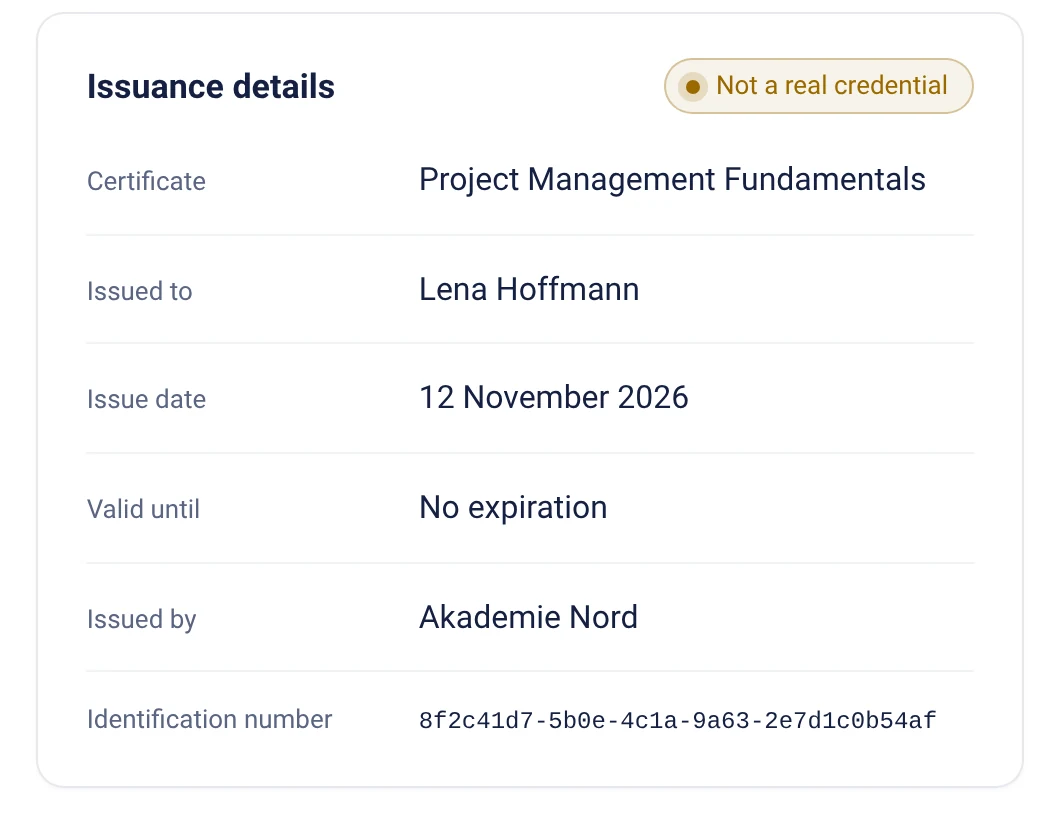
Some verification pages also let you upload the PDF. The page then checks the signature and whether the file belongs to this record3.
Check 4: read the digital signature
A digitally signed PDF shows its signature in the PDF reader. In Acrobat and Reader, signatures that trace back to a certificate authority on the Adobe Approved Trust List are trusted automatically6. A signature marked as invalid is a reason to ask the issuer.
In a sealed Virtualbadge.io PDF, changing even a single character means the signature no longer matches4. A missing signature does not prove a fake, but it removes one of the strongest checks.
Check 5: read the status
A certificate can be genuine and still invalid. Certifications expire, and issuers revoke credentials. Only the issuer's current record shows that.
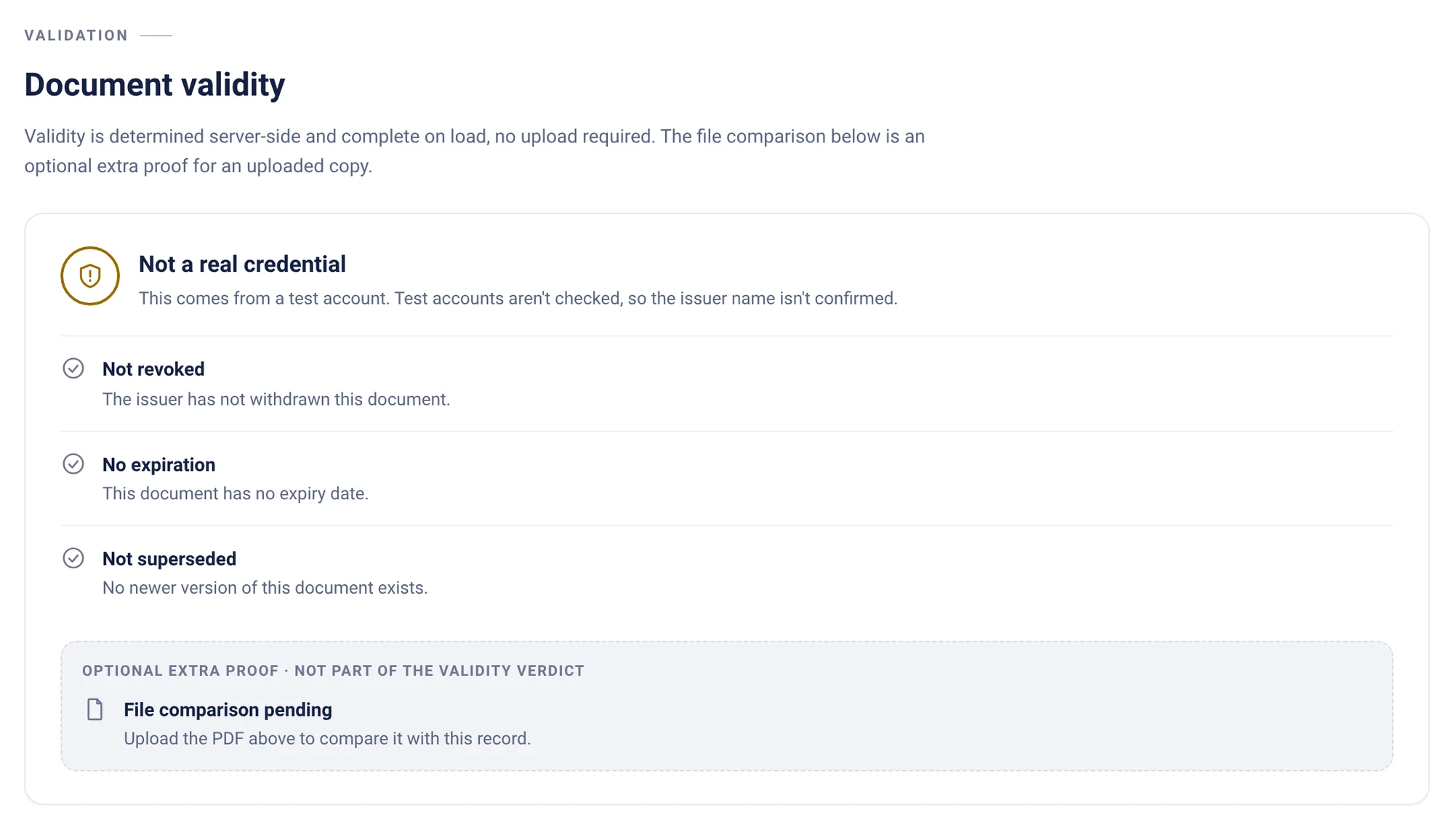
On a Virtualbadge.io validation page, the status is determined when the page loads: whether the credential was revoked, whether it expired and whether a newer version exists3. A revoked credential shows the revocation and hides personal data10.
When a check fails
- Do not reject on the spot. Mismatches can be typos or name changes.
- Contact the issuer through its official website and give the identification number.
- Document the certificate, your checks and the answers you received.
- If the issuer confirms a fake, follow your internal process and the issuer's guidance.
Issuers that find fakes of their certificates can follow the fraud response plan.
For issuers Make your certificates this easy to check.
Frequently asked questions
How can I check if a certificate is real for free?
Most issuers offer free online verification. Virtualbadge.io validation pages need neither an account nor an app3. For nursing licenses, Nursys QuickConfirm is free for employers8.
Is a QR code on a certificate enough proof?
No. A QR code can lead to a copied page. Check that it leads to the issuer's real domain, or open the issuer's website yourself9.
How do I verify a certificate without a verification page?
Contact the issuer's registrar or certification department through its official website, with the name, date and number on the certificate. Most college registrars confirm dates of attendance, graduation and degrees on request1.
What if the certificate is real but belongs to someone else?
Every document check passes. Compare the holder's name on the verification page with the candidate's ID.
As of Nov 18, 2026. We check the facts regularly. Is something out of date? Tell us, and we will fix it.
Sources
- Federal Trade Commission: Avoid fake-degree burns by researching academic credentials (guidance for business) accessed November 18, 2026
- U.S. Department of Education: College accreditation: find accredited schools, page reviewed January 8, 2026 accessed November 18, 2026
- Virtualbadge.io, how-to guides: Verify a certificate: by QR code, link or PDF upload accessed November 18, 2026
- Virtualbadge.io, how-to guides: Digitally seal PDF certificates and verify the signature accessed November 18, 2026
- Council for Higher Education Accreditation (CHEA): Fact Sheet #6: diploma mills and accreditation mills, May 2003 accessed November 18, 2026
- Adobe: Adobe Approved Trust List (AATL) accessed November 18, 2026
- U.S. Department of Education: Diploma mills and accreditation, page reviewed April 24, 2025 accessed November 18, 2026
- National Council of State Boards of Nursing (NCSBN): Nursys: nurse license verification, QuickConfirm and e-Notify accessed November 18, 2026
- AI Fraud Protect (FutureNext GmbH): AI Fraud Protect: copies of your website, fake verification pages and phishing in your name accessed November 18, 2026
- Virtualbadge.io, how-to guides: Revoke or replace a certificate accessed November 18, 2026