No user accounts required for your recipients -
Start your 7-day free trial now!

How education providers meet accreditation requirements and reliably stay on top of recertification deadlines with tamper-proof digital certificates.


Auditors take a close look at accredited training programs. They review not only course content and instructors, but also whether every issued certificate is properly documented and can be checked for authenticity at any time. Anyone still relying on Word templates, Excel lists and PDF attachments sent by email quickly collects findings in the audit and loses many hours internally on rework. With a platform like Virtualbadge.io, this process can be set up in a much leaner way. The following three steps show what matters.
Every accreditation body defines its own documentation requirements. These are often based on standards such as ISO/IEC 17024 for the certification of persons or on industry-specific regulations such as the DGUV principles. At their core, almost all bodies require certificates to be clearly assigned to one person, protected against manipulation and verifiable throughout their entire period of validity.
Before you digitize your process, it is worth creating a short checklist of the mandatory information. Typical items are:
Also clarify whether third parties such as employers or examiners must be able to verify the credentials independently. This determines which security features your certificates need. Guidance is provided by the BSI handout “Digitale Zeugnisse”, which recommends cryptographic methods and digital signatures as the foundation of tamper-proof educational credentials. The legal framework for electronic signatures and seals in Europe is set by the eIDAS Regulation (EU) 2024/1183.
In the next step, your checklist becomes a digital template. In the drag-and-drop designer of Virtualbadge.io, you create dynamic placeholders that are automatically populated with participant data when the certificates are sent. This way, every certificate contains exactly what the accreditation body wants to see, without anyone typing names or data by hand.
Pay attention to the following points when setting up the template:
Central management is especially important when there are several locations or issuers. When all authorized persons access the same approved templates, no deviating versions arise that raise questions in an audit. Design and content remain consistent, even when certificates are issued in a decentralized way.
For auditors, a certificate is only worth as much as its verifiability. That is why every certificate issued with Virtualbadge.io receives its own QR code and validation page. A single scan is enough, and examiners can see at a glance:
%201.png)
In addition, certificates can be cryptographically signed so that any subsequent changes are immediately noticeable. If you want to offer verification entirely under your own brand, you can embed the validation page as a white-label solution on your own domain. Auditors and employers then verify directly with you, without detours via third-party platforms.
For more information, read: How to Protect Your Certificates from AI Fakes
Manual issuance is the most common source of errors. Therefore, connect your learning management system, CRM or seminar management software to Virtualbadge.io via API, Zapier or CSV upload. As soon as a course is completed, the data is transferred and the certificate is automatically sent to the participant by email. How much time this saves is shown by the training provider IMN Training, which reduced the effort for its certificate administration from 60 to 10 minutes, as described in this success story.
For accredited programs with recertification requirements, a second building block is added:
Before the first live dispatch, start with a test run in a small group. This lets you see whether all placeholders are populated correctly and the emails arrive reliably.
Virtualbadge.io brings together everything you need for audit-proof credentials in accredited training programs: templates with mandatory fields, QR code verification, cryptographic signatures, automated issuance and the management of expiry dates. The platform is based on W3C Verifiable Credentials and eIDAS 2.0, and the data is stored on European servers in compliance with the GDPR.
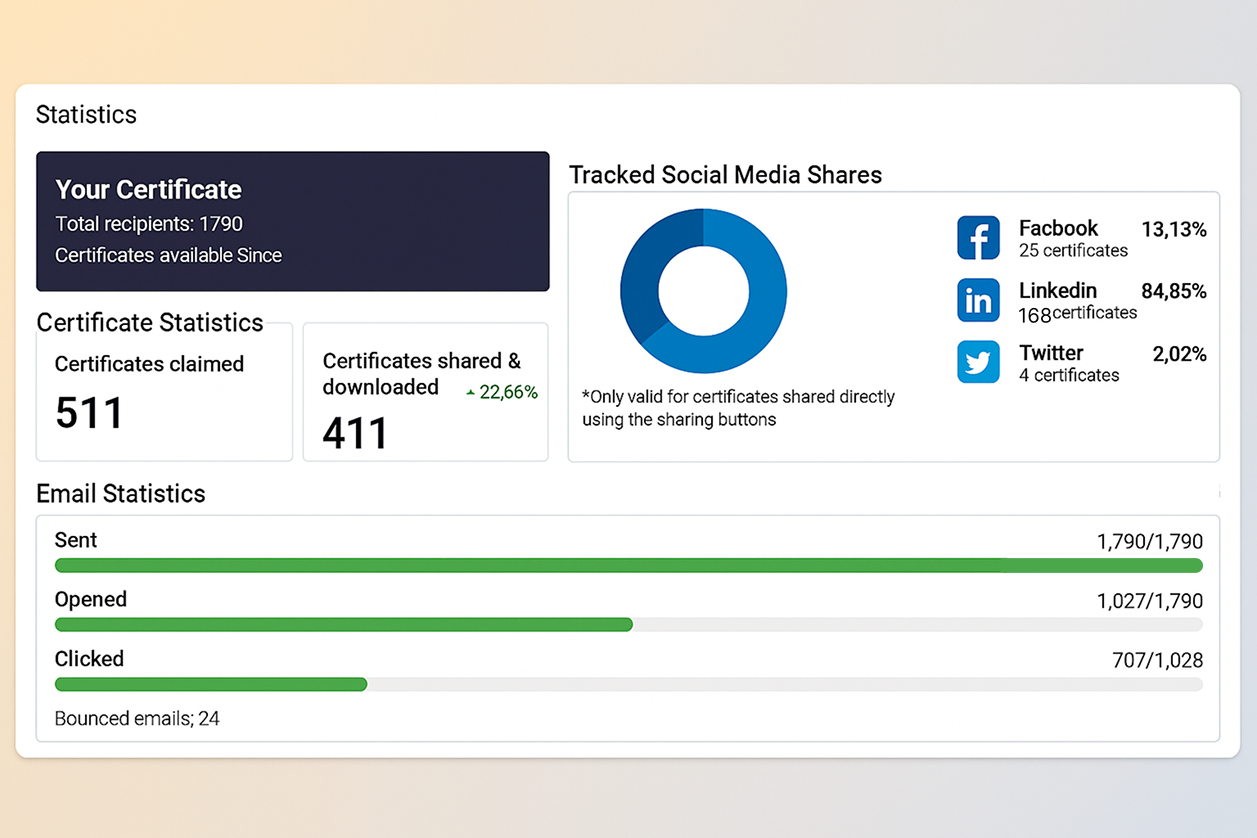
Via the dashboard, you can see at any time how many certificates have been issued, accessed and shared. Before an audit, you therefore have all the information in one place instead of gathering it from different folders.
Book a free demo now and find out how your accredited training programs become audit-proof.
What does “audit-proof” mean for digital certificates?
Audit-proof means that every certificate is clearly documented, protected against manipulation and verifiable at any time. At Virtualbadge.io, this is ensured by the QR code, the validation page and the cryptographic signature.
How do auditors verify the authenticity of a certificate?
They scan the QR code or open the validation page. There they can see the issuer, recipient, date of issue and current validity status. In addition, the generated PDF files can be verified directly by dragging and dropping them onto the Virtualbadge.io validation page. This protects both the digital credential and its PDF version against any attempt at falsification.
Can recertification deadlines be monitored automatically?
Yes. You define an expiry date for each template, and participants are reminded by email in good time.
* You can find the organisation ID in the URL when you access your LinkedIn Company page as an admin.


Marketing

Oct 21, 2026

5 min
A note on how we write: we use AI tools to help with research and drafting. Every article is then reviewed, edited and fact-checked by someone on the Virtualbadge.io team before it goes live. The final word is always human.

Use Virtualbadge.io to design and send digital certificates that create trust - in less than 10 minutes.
%20(1).svg)