No user accounts required for your recipients -
Start your 7-day free trial now!

A practical guide for accredited education providers to manage validity periods, seamless audit trails, and automated renewals of digital certificates without losing credibility.


The first step is to ask which certificates need an expiry date at all. In accredited continuing education, regulatory requirements often set the pace. First aid certifications, for example, expire after two years, while other qualifications remain valid indefinitely.
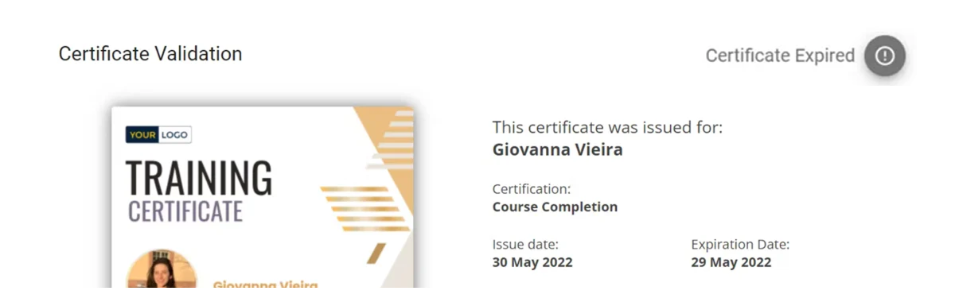
The German first aid market shows how important structured renewal cycles are for education providers in practice, as you can read in this success story.
Next, define what participants must do to renew:
Choose the model that fits your accreditation, put it in writing, and communicate the criteria clearly to your participants. The clearer the requirements, the fewer queries and delays occur in the renewal process.
An audit trail logs every action related to a certificate: issuance, changes, renewal, and revocation, each with a timestamp and user ID. With paper certificates, this documentation usually builds up through filing cabinets and spreadsheets, which is error-prone and hardly scalable with large numbers of participants. Digital platforms, by contrast, log every step automatically, which is indispensable for audits by accreditation bodies.
In addition, automatic reminders prevent deadlines from passing unnoticed. Configure email notifications that are sent, for example, 90, 60, and 30 days before expiry and inform your recipients that their certificates are about to expire, as well as about the next steps.
Manual renewals work with a handful of participants, but with several hundred they become a bottleneck. Connect your learning management system or CRM to your certificate platform via an API or Zapier so that renewed credentials are created and sent automatically as soon as someone meets the recertification criteria. This way, data flows directly into certificate issuance without anyone having to reconcile lists by hand.
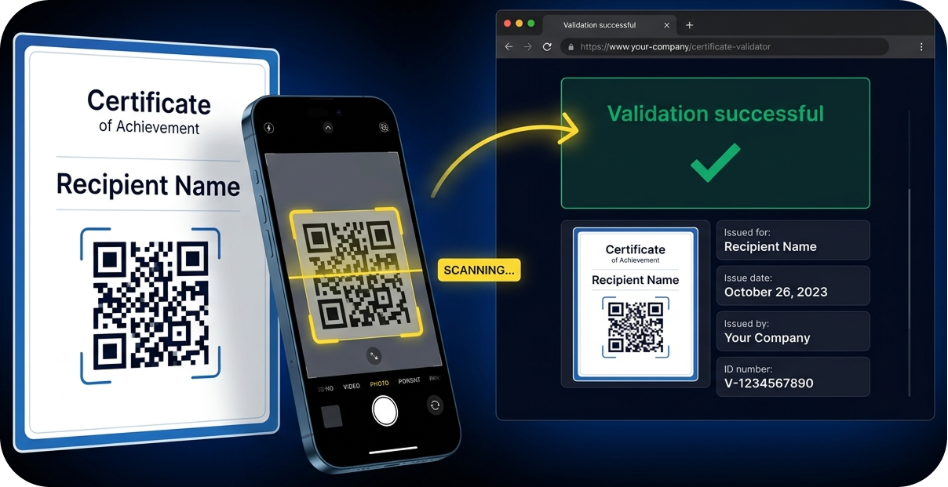
After renewal, a certificate must also remain verifiable for third parties. Every digital certificate should therefore be linked to a public verification page where employers and examination bodies can instantly see via QR code scan whether a credential is valid, expired, or revoked. This protects against forgery and strengthens trust in your certificates.
Accreditation bodies check three core points: Is the certificate forgery-proof, can its issuance be traced without gaps, and is its validity status available at any time? The German Federal Office for Information Security sets out clear requirements for integrity and verifiability in its guidance paper on digital diplomas, which many bodies use as a benchmark.
Therefore, keep track of regular dashboard reports to see how many certificates are active, expired, or in renewal.

Filter by certificate type, time period, or participant group to spot the need for action early, ideally in quarterly reviews, before an audit by the accreditation body is due. For details on regulated requirements, read: Digital Certificates in Regulated Industries: What to Look For
Virtualbadge.io covers recertification from initial issuance to renewal in one system. You define validity periods, and the platform takes care of automatic expiry reminders, seamless audit trails, and forgery-proof certificates with QR code verification. Via API and Zapier, you connect Virtualbadge.io directly to your learning management system or CRM, so that renewals happen without manual rework and no deadline slips by unnoticed.
Try it free for 7 days to see how easily you can manage your recertification processes with Virtualbadge.io, or book a free demo.
What is an audit trail for digital certificates?
An audit trail automatically documents every action related to a certificate with a timestamp and a unique certificate ID, so you can prove the complete history at any time during audits.
How often should digital certificates be recertified?
That depends on the industry and the accreditation body. Safety-relevant training often requires renewal every one to two years. Virtualbadge.io allows you to set individual validity periods per certificate type.
Can expired certificates still be verified?
Yes. The verification page remains accessible and transparently shows third parties that a certificate has expired, leaving no room for misunderstandings about its validity status.
* You can find the organisation ID in the URL when you access your LinkedIn Company page as an admin.


Marketing

Oct 6, 2026

5 min
A note on how we write: we use AI tools to help with research and drafting. Every article is then reviewed, edited and fact-checked by someone on the Virtualbadge.io team before it goes live. The final word is always human.

Use Virtualbadge.io to design and send digital certificates that create trust - in less than 10 minutes.
%20(1).svg)